
Web shop
Your customers choose an article's options in the shop and see the matching price. The basket can be handed over via OCI 5.0.
3D product catalogue for OFML® data
The 3D Office WebKatalog shows your articles as configurable 3D models, based on your OFML® data. You embed it in your web shop, website or software and keep maintaining your articles in OFML® only.
The demo works without signing in.
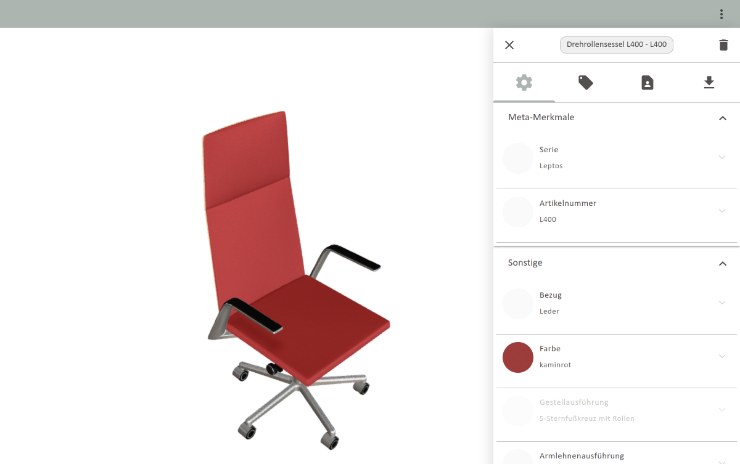
Loading the demo …
Runs in the browser, no plug-in needed.
Supported standards
* pCon is a trademark of EasternGraphics GmbH; the WebKatalog is an independent competing product.
All three use the same OFML® data set.
Your customers choose an article's options in the shop and see the matching price. The basket can be handed over via OCI 5.0.
Embedded in your existing website via iframe. No development work is needed on your side.
An interface makes article texts, prices, images and 3D models from your OFML® data available in your own system.
Articles can be rotated, zoomed and configured. Rendering uses WebGL and needs no plug-in.
Properties, variants and prices come straight from your OFML® data. Only what can actually be ordered is selectable.
The basket goes to your shop or procurement system with article number, variant code, short text and price.
CAD data, article images, PDF data sheets and 3D models for each configuration.
A QR code lets you view the article in your own room on a smartphone.
The interface is available in German, English, Polish and Czech. Article texts appear in the languages of your OFML® data set.
Configured articles go into your shop's basket or wish list with one click and can be reconfigured later. Alternatively, your customers send an enquiry that already contains the configuration.
Net prices, optionally also gross prices including VAT. Discounts are shown with the original price struck through.
Instead of the full catalogue, the WebKatalog shows just one article. That way it fits directly onto a product page in your shop.
Shown are articles from the .leptos, .karlo and .intra series plus media technology. The data is provided by Spiegels GmbH & Co. KG.
A complete conference set-up including seating is configured as a single article. Dimensions and finish can be checked from every side in the 3D view, and every change shows up on the model straight away.
Properties with few values, such as the width, appear as a toggle, yes/no properties such as the chrome feet as a switch, and veneers as a colour chip showing the real material. The “changed only” filter shows at a click what differs from the standard version. This helps with articles that have many properties.
Swivel chairs, sofas, desks, media walls and conference set-ups sit in the same catalogue and are configured the same way.
Every configuration comes with CAD models for planning, a PDF data sheet and an AR view for the smartphone.
The catalogue structure of categories, series and articles is built from your OFML® data, with a preview image for every entry. You decide whether the full catalogue is shown or the WebKatalog opens directly in one series.
You provide us with your existing OFML® data set.
We set up the WebKatalog for your data. On request we also take care of the customising, such as the look in your own colours.
The WebKatalog is linked, embedded via iframe or connected to your system through the interface.
Integration & Demo
We host and run the WebKatalog. You link to it or embed it in your website via iframe. Our demo shop shows what this looks like in a shop.
<iframe> tag<!-- WebKatalog on your page -->
<iframe
src="https://web.3doffice.de/webkatalog2_5
?artikel=L400&lang=en"
width="100%" height="640"
style="border:0" loading="lazy">
</iframe>Present series in 3D and provide dealers with current product data.
Offer configurable articles in your own shop without creating every variant individually.
Bring article texts, prices and 3D models from OFML® data into your own software through an interface.
Long-standing customers whose OFML® data we look after.









You can start small and extend later.
The price depends on the size of your data set and the integration you need, so we discuss the terms with you individually.
Answers to common questions about the WebKatalog.
OFML® (Office Furniture Modelling Language) is the data standard of the office furniture industry. It describes an article with all its variants, configuration rules, prices and 3D geometry. The WebKatalog reads this data directly, so nothing has to be maintained twice.
Yes, the WebKatalog builds on an OFML® data set. If you do not have one yet or yours is out of date, we can create or update it for you on request.
No. The WebKatalog runs in any current browser, including phones and tablets. No plug-ins or downloads are needed.
The simplest option is an iframe controlled by URL parameters. If your shop should handle price, basket and design itself, the shop and the WebKatalog also exchange messages via postMessage. The WebKatalog then supplies the 3D view and the article data. You can try both options in the demo shop.
Via OCI 5.0, the standard supported by SAP and the common procurement platforms. After configuring, article number, variant code, short text and price are transferred to the basket of the procurement system. Systems without OCI can be connected through a REST interface that provides articles, properties, prices, images and CAD models.
No. Short and long texts, variants, rules and prices come straight from your OFML® data set. The WebKatalog generates article images for each configuration. You therefore do not need a second data set in your shop.
Yes. The WebKatalog reports actions such as selecting an article, opening the AR view or downloading a PDF to the page it is embedded in. You can feed this data into your own analytics tool.
The interface is available in German, English, Polish and Czech. Article texts appear in whichever languages your OFML® data set contains.
There are two pricing models. The cost depends on the size of your data set and the integration you need, and is clarified in a free initial consultation. The demo is free and needs no registration.
In a free initial consultation (about 30 minutes) we look at your data set and discuss the options.
Or write to us directly at service@3doffice.de.

Open the demo on your phone
Open the demo